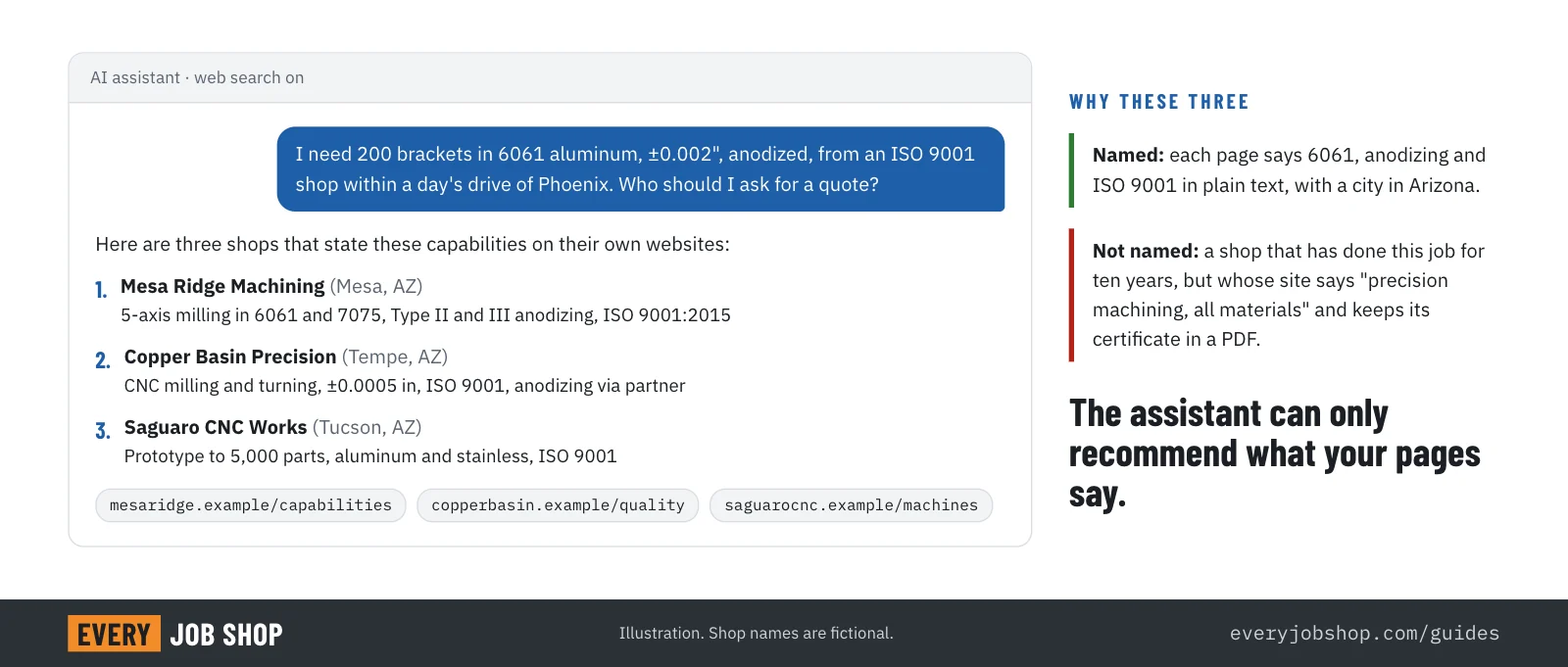
Most shop owners believe that if their website ranks on Google, AI assistants will find them too. Then a buyer types into ChatGPT: "I need 200 brackets in 6061 aluminum, ±0.002", anodized, from an ISO 9001 shop within a day's drive of Phoenix." The assistant answers with five names. Yours is not on the list, even though you have done exactly that job for ten years.
Why not? Usually not because the assistant ranked you lower. It never learned that you do it.
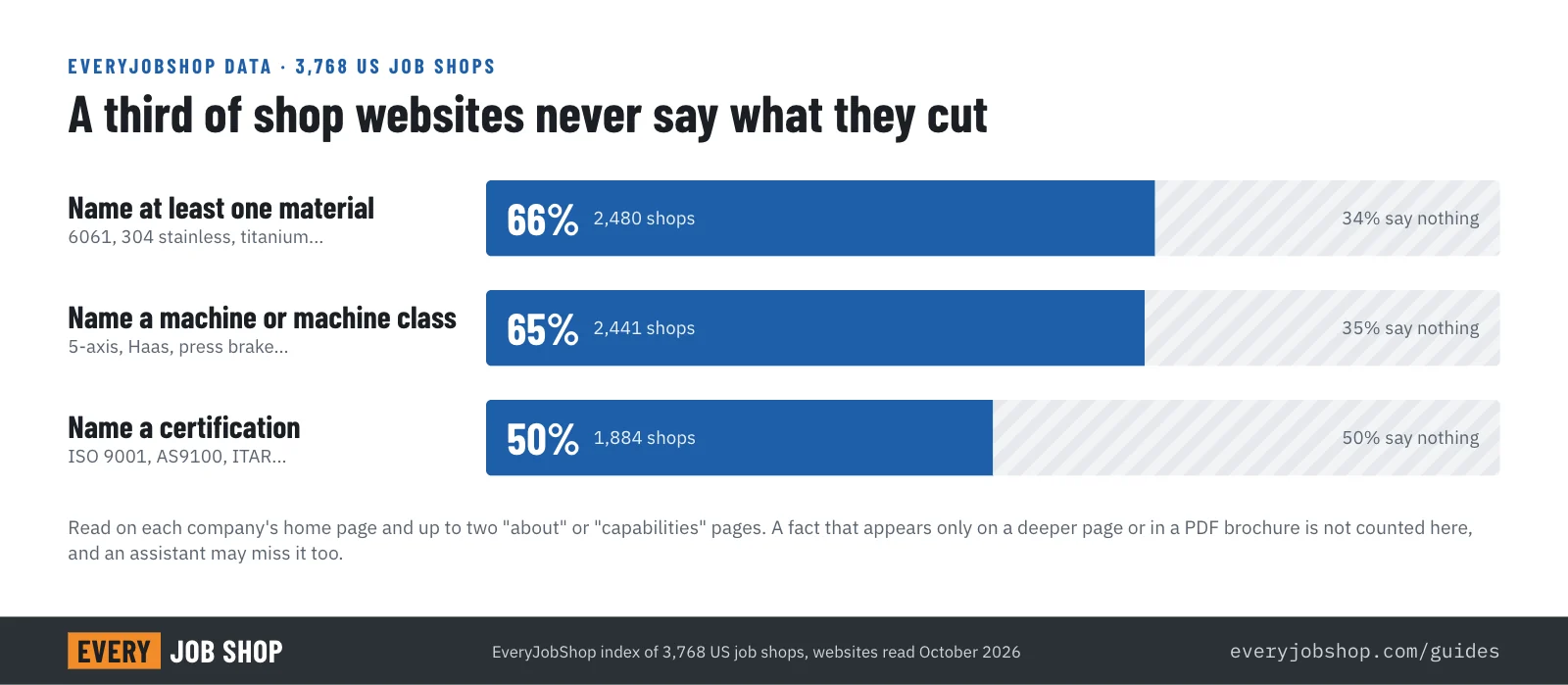
We read the websites of 3,768 US machine shops, fabricators and foundries for the EveryJobShop index. On the home page and up to two "about" or "capabilities" pages, a third of the shops never name a single material they work with, a third never name a machine, and half never mention a certification. To an AI assistant matching "6061, anodized, ISO 9001", those shops do not exist.
This guide explains how assistants pick the shops they recommend, and how to fix your shop's visibility step by step.
Buyers have started asking assistants instead of searching
In G2's 2025 survey of 1,169 B2B decision-makers, 29% said they start research in tools like ChatGPT more often than on Google. That survey covers software buyers, not manufacturing buyers, and nobody has published a comparable study for buyers of machined parts yet. But the engineers and buyers who send you RFQs use the same tools at their desks, and the direction is the same.
The difference matters. A search engine shows ten links and lets the buyer read. An assistant reads the pages for the buyer and returns a short list. If your page does not answer the question, you are not on page two. You are not mentioned at all.
How an AI assistant chooses which shops to name
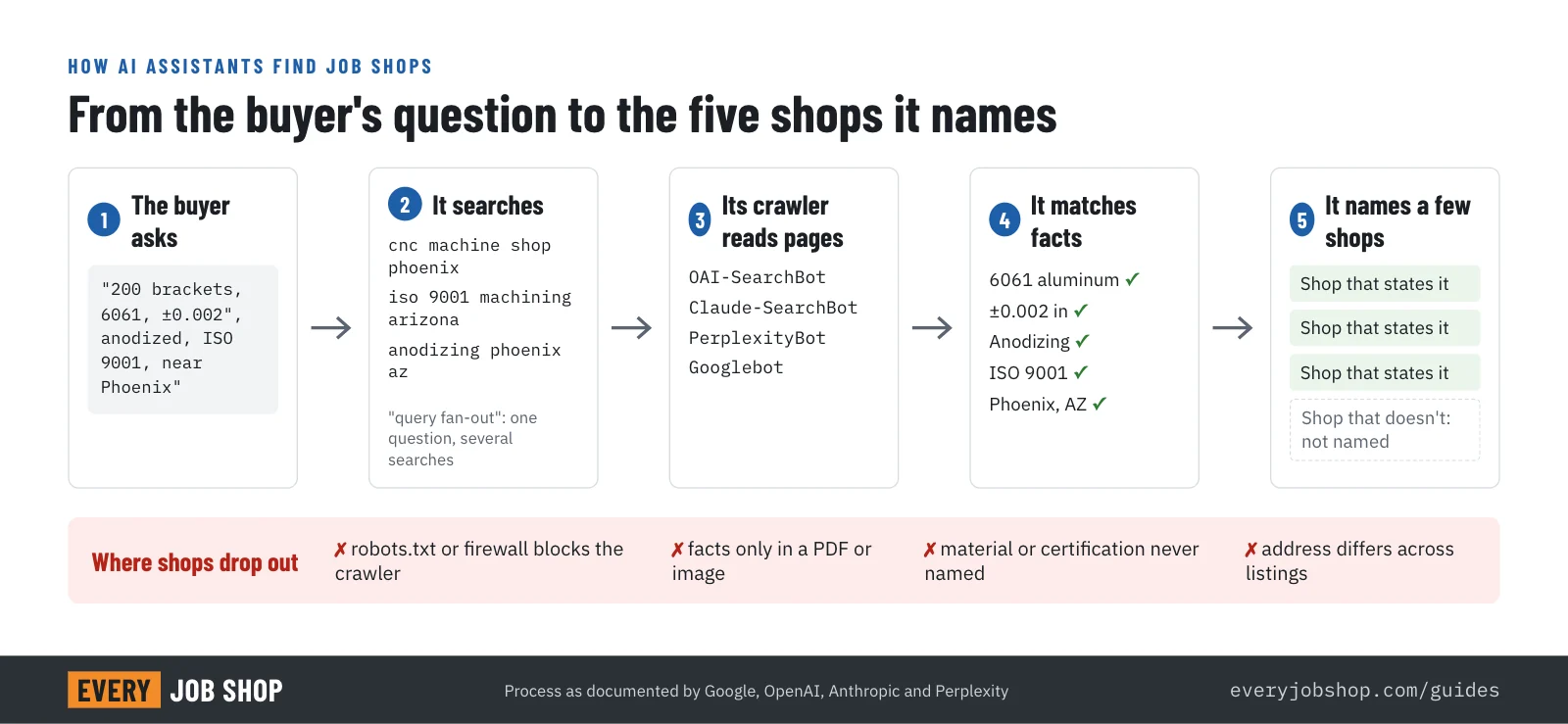
No assistant publishes its ranking rules. What the companies do document is how they reach and read websites:
- It searches first. ChatGPT search, Claude, Perplexity and Google's AI features all look up current web pages before they answer. Google says its AI features may use "query fan-out": one question becomes several related searches, such as "CNC machine shop Phoenix", "ISO 9001 machine shop Arizona" and "aluminum anodizing Phoenix".
- It can only read what its crawler can reach. Each company runs its own search crawler: OAI-SearchBot for ChatGPT search, Claude-SearchBot for Claude, PerplexityBot for Perplexity and Googlebot for Google. OpenAI states that sites which opt out of OAI-SearchBot are not shown in ChatGPT search answers.
- It reads the text on the page. Facts written as plain text are easy to use. Capabilities hidden in a PDF brochure, an image of an equipment list or a slider on the home page are much harder to read, and often not read at all.
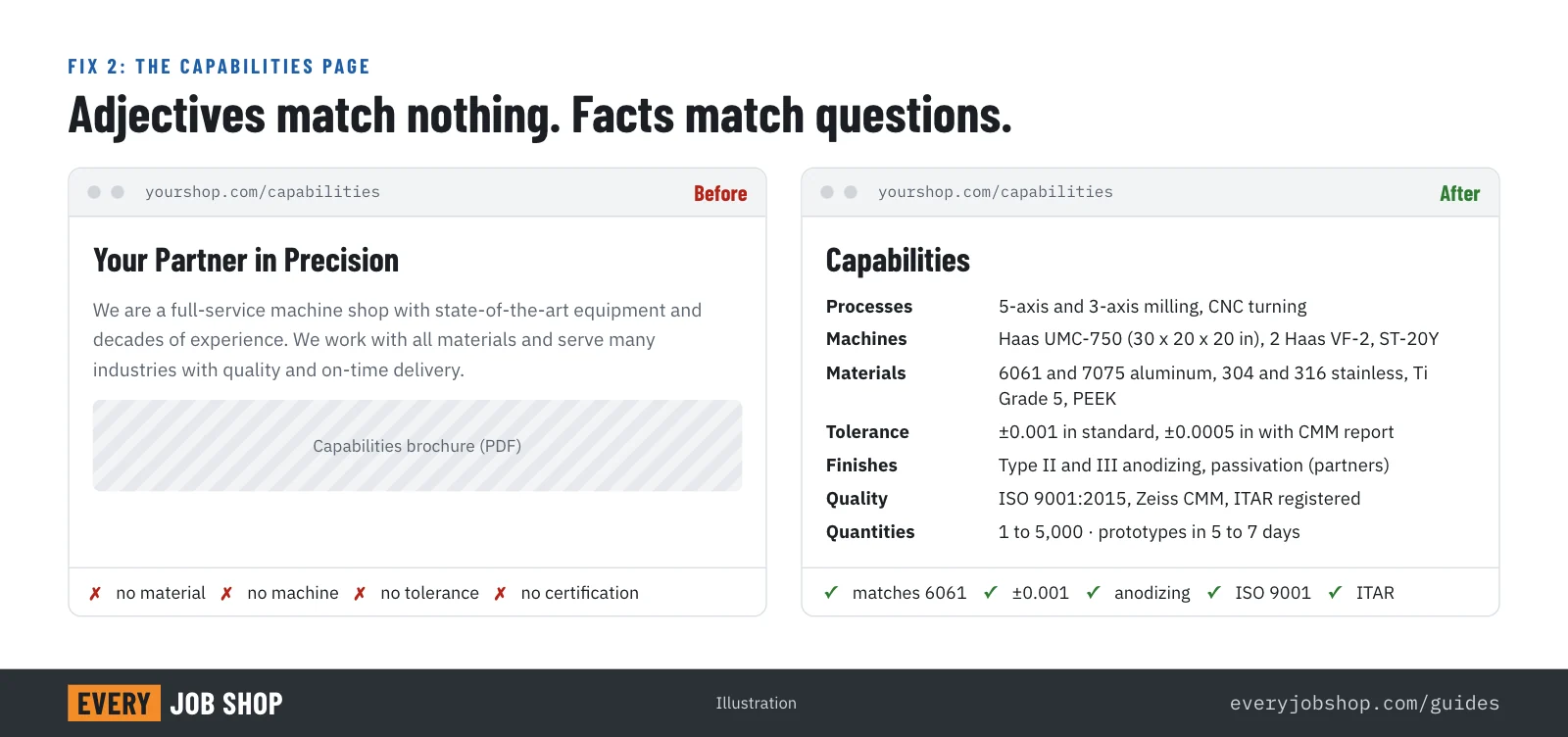
- It matches the request against stated facts. "Full-service machine shop with state-of-the-art equipment" matches nothing. "5-axis milling up to 30 x 20 x 20 in, 6061 and 7075 aluminum, Type II and III anodizing through a partner, ISO 9001:2015" matches a lot.
- It prefers facts it can confirm. When the same name, address and capabilities appear on your site, your Google Business Profile and the directories that list you, an assistant can be more confident it has the right shop. A mismatch (an old address, a different company name) is a reason to leave you out.
Google is explicit that there is no special trick: "There are no additional requirements to appear in AI Overviews or AI Mode, nor other special optimizations necessary." A page has to be indexed and eligible for a snippet. Everything else is about whether the page says what the buyer asked for.
The 10 fixes, in the order we would do them
1. Let the AI search crawlers in
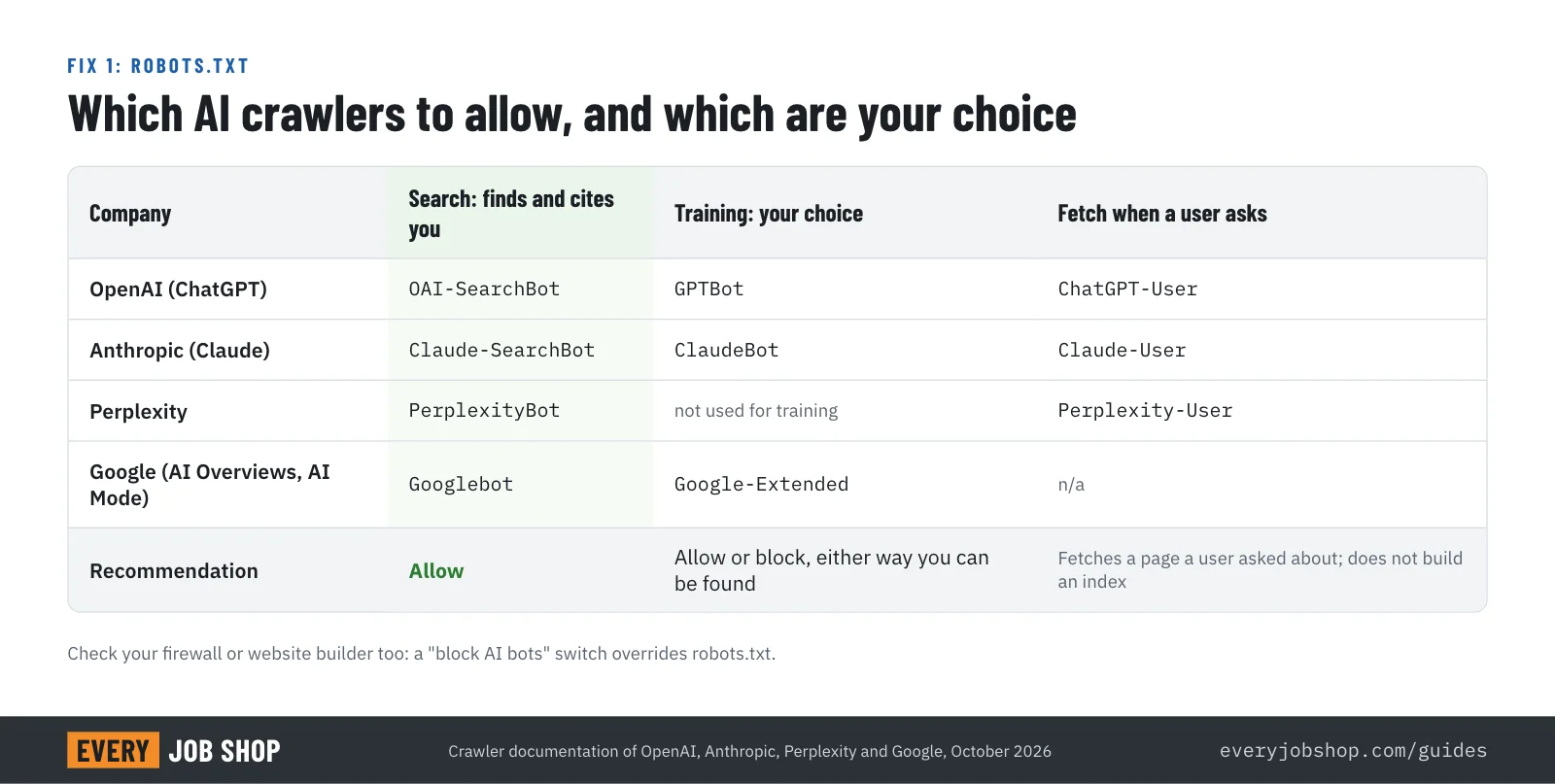
Open yoursite.com/robots.txt. If it blocks everything except Google, or blocks the crawlers named above, assistants cannot read you. You can allow search and still block training, because each company uses separate crawlers for each purpose:
# Search crawlers: allow, so assistants can cite you
User-agent: OAI-SearchBot
Allow: /

User-agent: Claude-SearchBot
Allow: /

User-agent: PerplexityBot
Allow: /

# Training crawlers: your choice
User-agent: GPTBot
Disallow: /

User-agent: ClaudeBot
Disallow: /
Also check your hosting or firewall. Many website builders and security services now offer a setting that blocks AI bots for the whole site. If it is on, the robots.txt file does not matter.
2. Write one capabilities page with the facts in plain text
This is the single most important fix. One page, linked from the main menu, that a buyer and an assistant can read in a minute:
- Processes: 3-axis and 5-axis milling, turning, Swiss, EDM, laser, press brake, welding, and so on.
- Machines: maker, model and work envelope, for example "Haas UMC-750, 5-axis, 30 x 20 x 20 in".
- Materials: by name and grade: 6061 and 7075 aluminum, 304 and 316 stainless, 4140, titanium Grade 5, Delrin, PEEK.
- Tolerances and finish: what you hold routinely and what you can hold with inspection.
- Quantities: prototypes, 1 to 50, production runs to 10,000.
- Secondary operations: anodizing, plating, heat treat, powder coat, assembly, in-house or through partners.
- Quality: certifications with the standard version and registrar, inspection equipment (CMM, optical comparator), and whether you are ITAR registered.
- Lead times: typical days for prototypes and for production.
- Industries: aerospace, medical, oil and gas, robotics, agriculture.
Write it as text, not as a picture of a brochure. Shops already know all of this. It just has to be on the page.
3. Say where you are and how far you ship
Assistants answer "near me" and "within a day's drive" questions with the address on your site and in your business listings. Put the full street address, city and state in the footer of every page, and say which region you serve and whether you ship nationwide.
4. Add structured data to the home page
Structured data tells search engines, in a fixed format, who you are and where you are. Google says you do not need special markup for its AI features, but the markup helps Search understand the business, and it costs one block of code:
<script type="application/ld+json">
{
  "@context": "https://schema.org",
  "@type": "LocalBusiness",
  "name": "Example Precision Machining",
  "url": "https://www.example-precision.com",
  "telephone": "+1-602-555-0100",
  "address": {
    "@type": "PostalAddress",
    "streetAddress": "1200 W Industrial Dr",
    "addressLocality": "Phoenix",
    "addressRegion": "AZ",
    "postalCode": "85009",
    "addressCountry": "US"
  },
  "description": "ISO 9001:2015 CNC machine shop: 5-axis milling and turning in aluminum, stainless and titanium, prototypes to 10,000 parts.",
  "knowsAbout": ["5-axis CNC milling", "CNC turning", "6061 aluminum", "Titanium Grade 5", "ISO 9001"],
  "sameAs": ["https://www.linkedin.com/company/example-precision"]
}
</script>
Keep the name, address and phone exactly as they appear everywhere else.
5. Fix your Google Business Profile
Google ranks local results on relevance, distance and prominence. Choose the primary category that matches what you do (for example "Machine shop" or "Metal fabricator"), list your services, add photos of real parts and of the floor, and ask your regular customers for reviews. Keep it identical to your website: same name, address, phone and hours.
6. Be listed, the same way, where buyers and assistants look
Assistants cross-check. Make sure your shop is listed with the same name, address and capabilities in the directories of your trade: industry associations, certification registries (an AS9100 certificate is listed in the IAQG OASIS database), supplier directories, and EveryJobShop, where a listing is free and a shop can verify its own facts. Each consistent listing is one more place where an assistant can confirm you exist and do what you say.
7. Show proof, not adjectives
Photos of finished parts with a one-line caption ("17-4 PH stainless manifold, ±0.0005 in bore, 250 pieces") say more to a buyer and to an assistant than "precision" and "quality" ever will. One short case study per industry you serve is worth more than a page of claims.
8. Make the next step obvious
When an assistant recommends a shop, the buyer clicks through to find out how to get a price. Say exactly how: an e-mail address or form for RFQs, the file types you accept (STEP, IGES, DXF, PDF drawings), and how fast you reply. The more automated assistants become, the more this matters. An automatic quote calculator on your own rates turns that step from days into minutes.
9. Get new pages indexed quickly
Verify the site in Google Search Console and Bing Webmaster Tools, submit your sitemap, and request indexing when you publish the capabilities page. IndexNow notifies Bing and other search engines of changes the moment you make them. OpenAI and Perplexity say robots.txt changes take about 24 hours to reach their systems; content changes follow when the pages are crawled again.
10. Test every month, the way a buyer would
Ask ChatGPT, Claude, Perplexity and Google's AI Mode the questions your best customers would ask. Use real specifics:
- "Which machine shops near Phoenix do 5-axis titanium work with AS9100?"
- "I need 500 laser-cut and bent 14 gauge steel brackets, powder coated, in Ohio. Who can do it?"
- "Find an ITAR-registered CNC shop in Texas for aluminum prototypes in under two weeks."
Write down whether your shop appears, what the assistant says about it, and which other shops it names. If it gets your facts wrong, the fix is almost always on your own pages or listings. Repeat after every change.
What about llms.txt?
llms.txt is a proposed file that summarizes a website for language models. Some AI tools read it; Google says you do not need AI text files to appear in its AI features. It is cheap to add and does no harm, but it does not replace a capabilities page. Do fixes 1 to 8 first.
How much work is this?
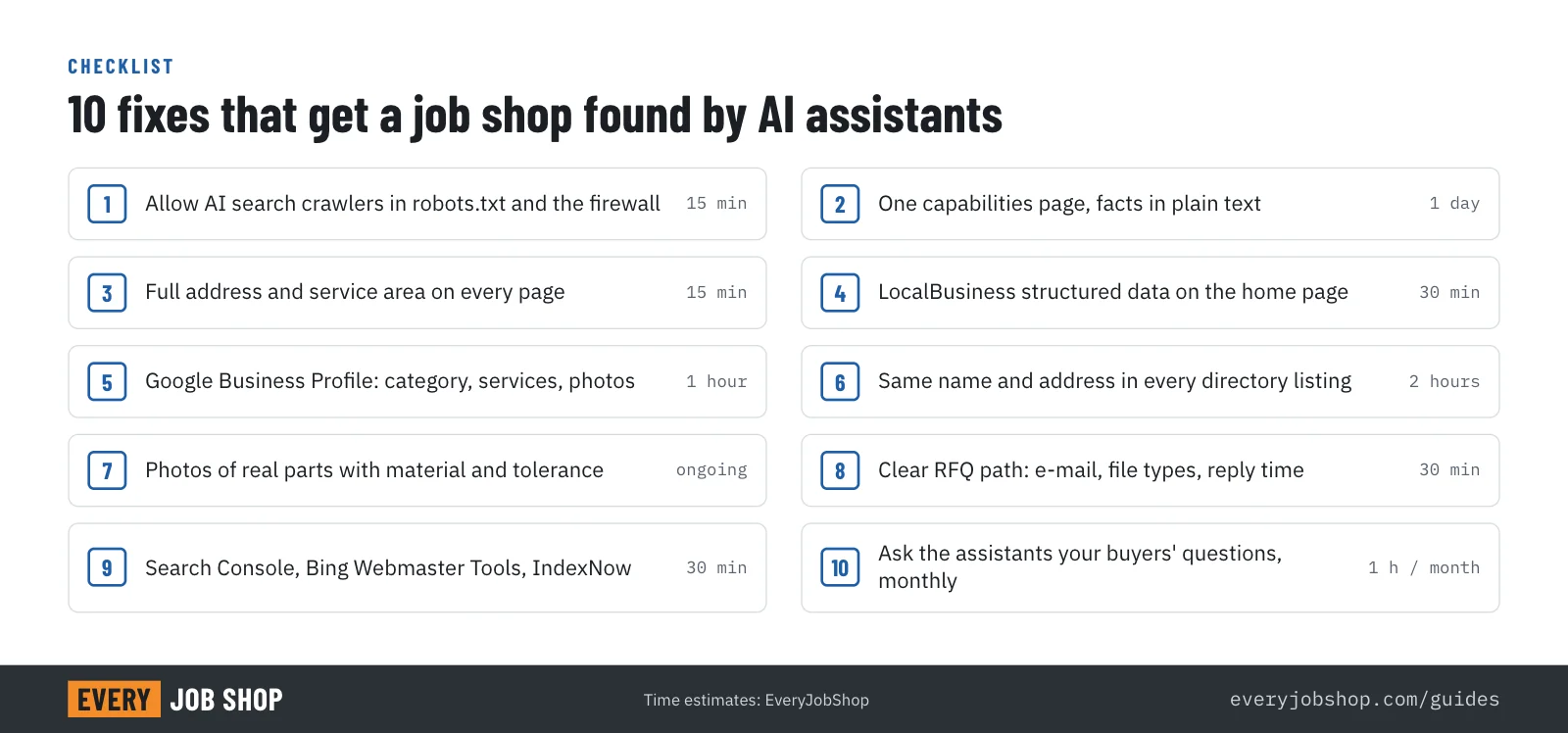
For most shops, fixes 1, 3, 4, 5 and 9 take an afternoon with whoever manages the website. Fix 2 takes a day of the owner's or the quality manager's time, because only they know the facts. Fixes 6, 7 and 10 are an ongoing habit of an hour or two a month.
The return is that when a buyer describes exactly the job you do best, the assistant has a reason to say your name.
Where EveryJobShop fits
EveryJobShop is a free index of US job shops, built so that buyers and AI assistants can find a shop by what it actually runs. Every listing states processes, materials, equipment, certifications and location, with the source and date. A shop can verify its listing for free in about two minutes and add what only it knows: the materials it quotes, lead times and the address its RFQs should go to.
For shops that want the whole job done, our specialists handle it end to end: the robots.txt and firewall check, the capabilities page written from a short interview, structured data, Google Business Profile, consistent listings, and a monthly test of what the assistants say about you. Book a free call below and we will start by showing you what ChatGPT, Claude and Perplexity say about your shop today.
Questions people ask
- Do I need to pay ChatGPT or Google to appear in AI answers?
- No. Being named in an answer does not require any payment or sign-up. Google states there are no additional requirements to appear in AI Overviews or AI Mode beyond being indexed and eligible for a snippet. What decides whether you appear is whether the assistant can reach your site and find the facts the buyer asked for.
- Is SEO still worth it if buyers use AI assistants?
- Yes. The assistants search the web before they answer, and Google's AI features are built on Google Search. Good SEO is the foundation. What changes is the detail: an assistant matches very specific requests (material, tolerance, certification, quantity, location), so the facts on your pages matter more than keywords.
- Should I block AI crawlers to protect my content?
- You can block training and still be found. OpenAI, Anthropic and Perplexity each use separate crawlers for search and for training, so a shop can allow OAI-SearchBot, Claude-SearchBot and PerplexityBot (search) while blocking GPTBot and ClaudeBot (training).
- Do I need an llms.txt file?
- It is optional. llms.txt is a proposed format that summarizes a site for language models. Google says you do not need AI text files to appear in its AI features. It costs little to add, but a clear capabilities page matters far more.
- How long until changes show up in AI answers?
- OpenAI and Perplexity say robots.txt changes take about 24 hours to reach their systems. New or edited pages appear after they are crawled and indexed again, which can take days to weeks. Submitting pages through Google Search Console and IndexNow speeds this up.
- How do I know if an AI assistant recommends my shop?
- Ask it. Use the same questions your buyers would ask, in ChatGPT, Claude, Perplexity and Google's AI Mode, and write down whether your shop appears and what is said about it. Repeat monthly, because answers change as the assistants re-index the web.