Many shop owners think instant quoting is something marketplaces do with guesswork, and that a real quote needs an estimator with ten years on the floor. The estimator part is true. But look at what that estimator actually does with a flat laser part: measures the cut length, counts the holes, picks the sheet, checks how many parts fit, multiplies by the machine rate, adds setup and margin. The same steps, every time, in the same order.
So why does a quote still take days in so many shops?
Because the arithmetic lives in one person's head and a spreadsheet. An automatic quote calculator is that arithmetic written down once, on your own rates, so it runs in seconds on every file that comes in. This guide shows how such a calculator works, with a full worked example, where it works well and where it does not, what the tools cost, and how to set one up without quoting yourself into a loss.
Speed wins work, but only on the right jobs
Buyers send the same RFQ to several shops, and a quote that arrives after the buyer has decided wins nothing. But speed alone is not the point. A Modern Machine Shop report on Advance CNC Machining found that the shop converted 40 to 50 percent of RFQs that suited it into orders, and only 4 percent of another class of RFQs.
That is the real case for a calculator. It answers the jobs you want in minutes, and it shows you in seconds which RFQs you should not spend an estimator's afternoon on.
What a quote calculator does, step by step
Every calculator, from a spreadsheet to commercial software, does five things:
- Reads the geometry. From a DXF: cut length, number of holes and contours (pierces), part size. From a STEP model: also thickness, bends and their angles, the flat pattern, volume and, for machined parts, features such as pockets, holes and threads.
- Turns geometry into machine time. Cut length divided by the cutting speed for that material and thickness, plus a fixed time per pierce. Bends times seconds per bend plus handling. For machining, material removed divided by removal rate, plus time per tool change and per setup.
- Turns time into cost with your hourly rate for each machine, plus gas and consumables where they matter.
- Adds material from your sheet or bar prices, using how much of a sheet the part actually takes after nesting.
- Adds setup, minimums and margin, and gives a price for each quantity break.
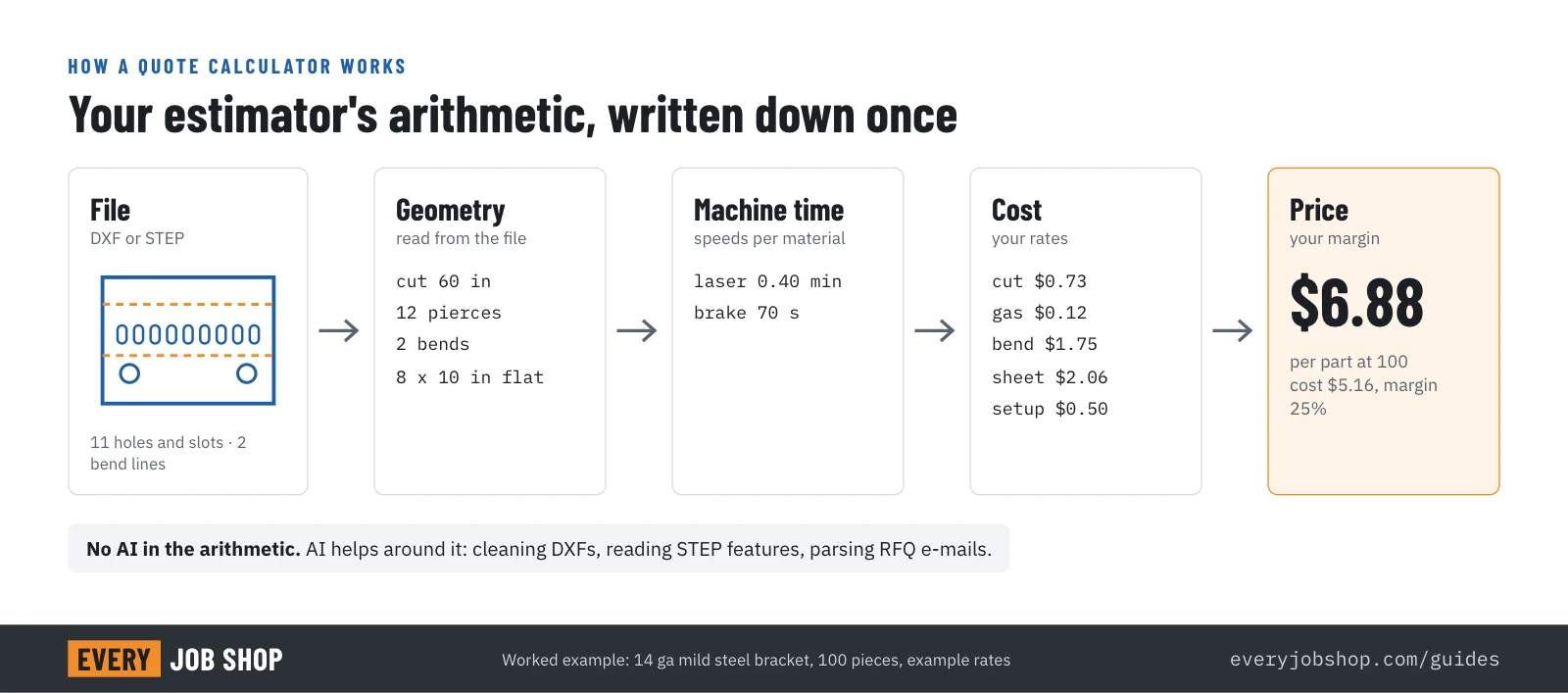
None of this is artificial intelligence. It is your estimating method, made explicit. Where AI helps is in the messy parts around it: cleaning up a customer's DXF, recognizing features in a STEP file, and reading an RFQ e-mail to fill in material, finish and quantity.
A worked example: a bent 14 gauge bracket
Take a simple bracket in 14 gauge (0.075 in) mild steel: 8 x 10 in flat, eleven holes and slots, two bends, 100 pieces. The prices and rates below are an example; a calculator uses yours.
| Step | Arithmetic | Per part |
|---|---|---|
| Cutting time | 60 in of cut ÷ 300 in/min = 0.20 min, plus 12 pierces (11 holes and slots and the outline) × 1 s = 0.20 min | 0.40 min |
| Cutting cost | 0.40 min × $110/h laser rate | $0.73 |
| Assist gas | 0.40 min × $18/h | $0.12 |
| Material | 80 sq in of a 48 x 96 in sheet ($95) at 80% nest utilization | $2.06 |
| Bending | 2 bends × 20 s + 30 s handling = 70 s × $90/h press brake rate | $1.75 |
| Setup | $50 laser and brake setup ÷ 100 parts | $0.50 |
| Cost | $5.16 | |
| Price at 25% margin | $5.16 ÷ (1 − 0.25) | $6.88 |
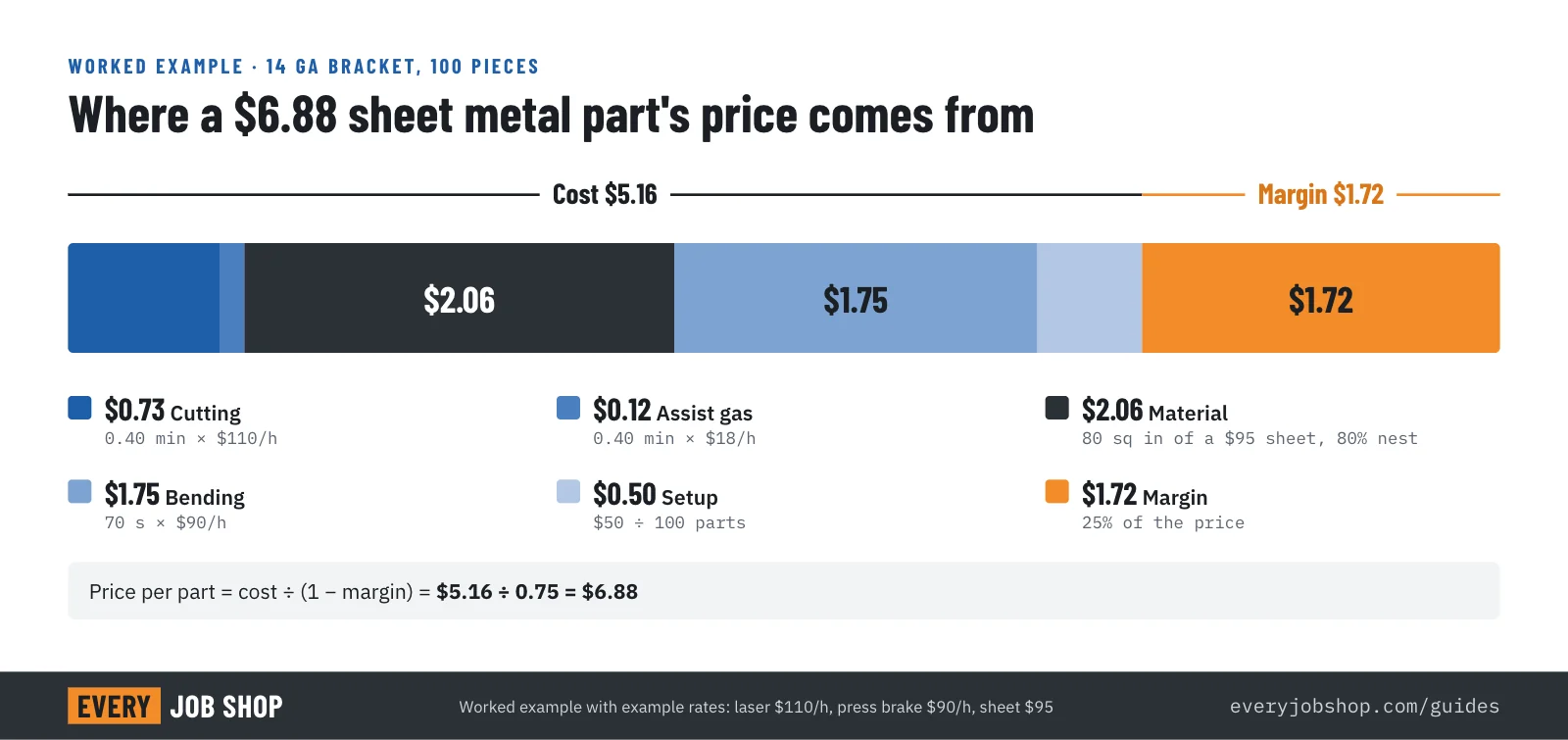
Two details in this table decide whether a calculator makes or loses money:
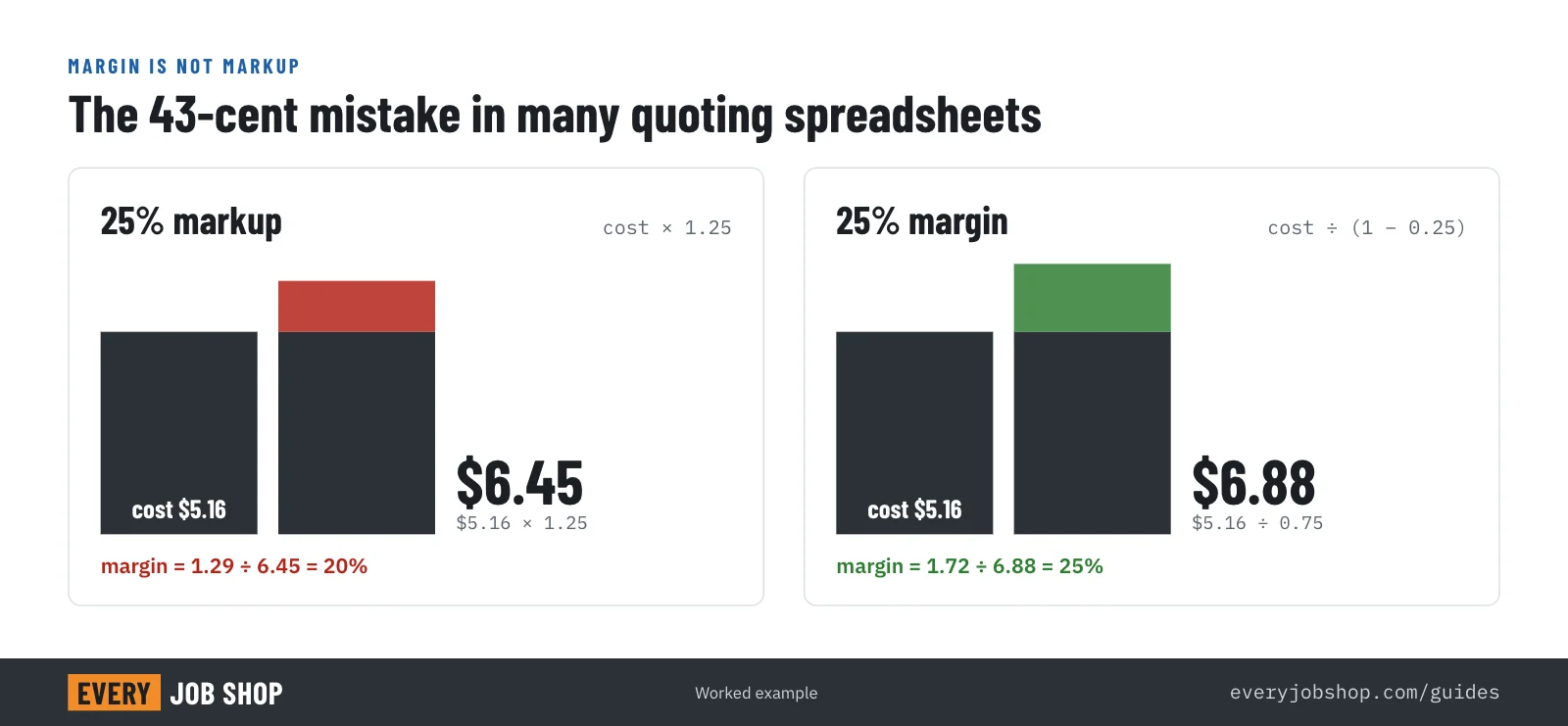
- Margin is not markup. Adding 25% to cost gives $6.45, which is a 20% margin. If your target is a 25% margin, divide by 0.75. Many hand-built spreadsheets mix the two up.
- Real cutting speed is lower than the book speed. A laser slows down in corners and small features. Calculators that divide cut length by the maximum speed underestimate time on detailed parts. Use effective speeds you have measured on your own machine, by material and thickness.
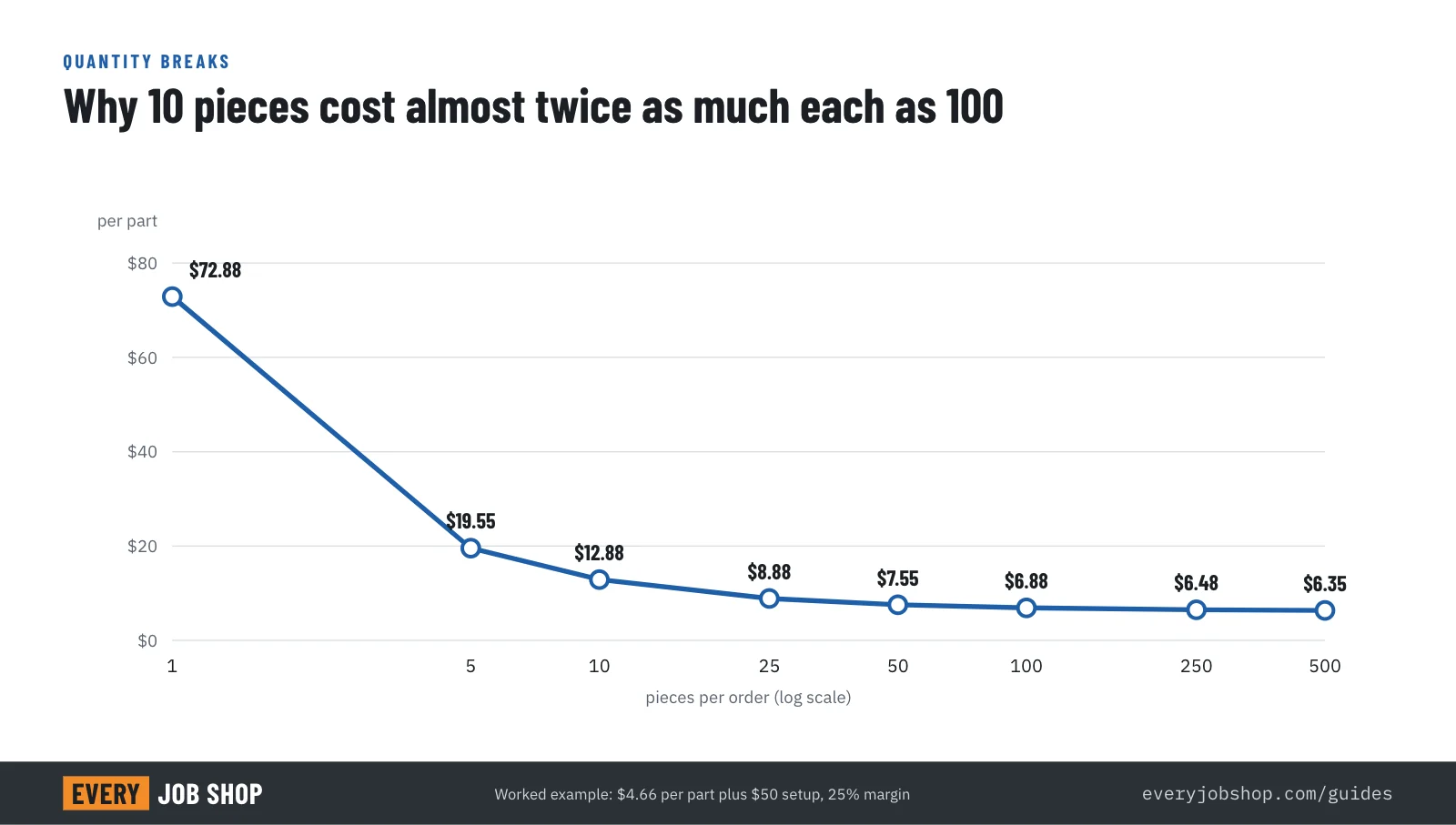
At 10 pieces the same bracket costs far more per part, because the $50 setup is spread over 10 parts instead of 100. A calculator shows every quantity break at once, which is exactly what a buyer wants to see.
Where your hourly rate comes from
The machine rate is the number most shops guess. Build it once:
- Machine cost per year: purchase price spread over its useful life, plus financing.
- Running cost per year: maintenance, service contracts, power, gas, consumables, floor space.
- Operator cost per hour, with benefits.
- Overhead share: office, estimating, quality, rent not already counted.
- Productive hours per year: hours the machine actually cuts, not hours the shop is open.
Rate per hour = (machine cost + running cost + overhead share) ÷ productive hours + operator cost per hour. A laser that cuts 2,000 hours a year needs a much higher rate than the same laser cutting 4,000 hours. When utilization changes, the rate should too.
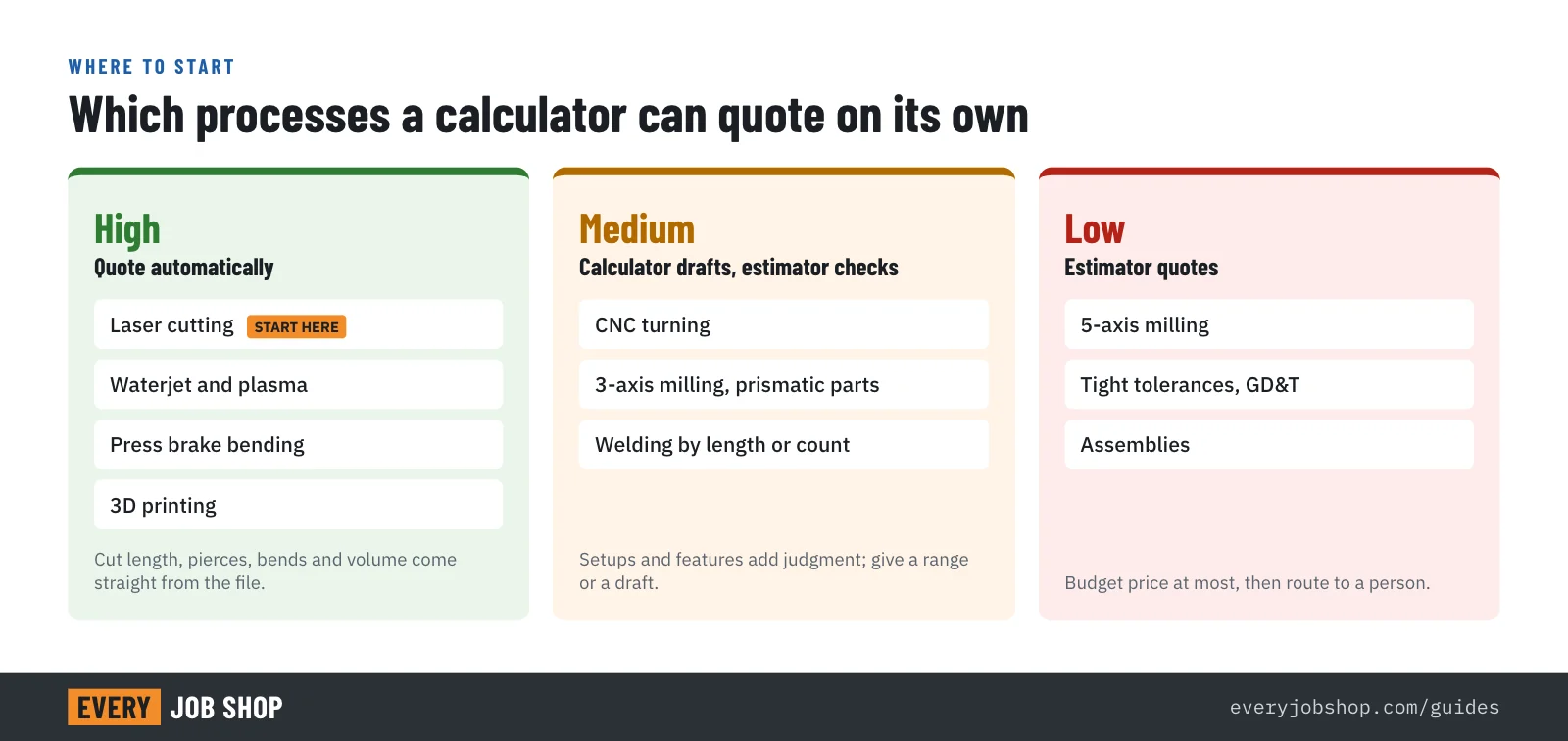
Which processes are easy to automate, and which are hard
| Process | How predictable | What the calculator needs |
|---|---|---|
| Laser, waterjet, plasma cutting | High | Cut length, pierces, speed table by material and thickness, sheet prices, nesting |
| Press brake bending | High | Bend count and length from the STEP model, seconds per bend and per flip, tooling changes |
| Turning | Medium | Stock size, material removed, features (grooves, threads), cycle time per feature |
| 3-axis milling, simple prismatic parts | Medium | Stock, removed volume, hole and pocket count, number of setups |
| 5-axis milling, tight tolerances | Low | Estimator judgment: the calculator should give a budget range and route to a person |
| Welding and assembly | Low to medium | Weld length or count, fixturing; usually a formula plus review |
| 3D printing | High | Part volume, build height, machine hours, material per cm³ |
Start where the arithmetic is predictable and the RFQ volume is high. For most fabricators that means laser cutting first, then bending.
Three kinds of tools, and who sets the price
- Estimating software for your estimator. Commercial tools read the file and build the quote inside your shop. For laser and sheet metal, CutQuote lists plans from $85 to $425 a month (as listed on 22 October 2026). Full estimating platforms for machine shops, such as Paperless Parts, are priced on request. Your rates, your price, your estimator in control.
- A calculator on your own website. Customers upload a file and get a price, or a budgetary price, from your rates. It turns website visitors into RFQs you can answer the same hour. Most estimating software offers this as a widget on higher plans.
- Marketplaces with instant quotes. Platforms such as Xometry and Protolabs quote the buyer themselves. That is fast for the buyer, but the marketplace sets the price and owns the customer relationship; the shop decides whether to take the job at that price.
The first two keep the customer and the margin with you. The third brings volume at someone else's price.
How to set up a quote calculator in eight steps
- Pick one process and one customer type. The one with the most RFQs and the most predictable arithmetic.
- Pull 30 to 50 past quotes for that process, with the files, the price you sent and, for jobs you won, the actual hours. This is your test set.
- Write down your rates: machine rate per hour (as above), material prices by sheet or bar size, setup cost per job, minimum order value, rush premiums.
- Measure effective speeds on your own machines for your common materials and thicknesses. A few test cuts are enough to start.
- Run the test set through the calculator and compare with your past quotes. Adjust speeds, setup and handling times until most quotes fall within a few percent of what your estimator would have sent, and you understand every outlier.
- Set the limits of what the calculator may quote on its own: materials, thicknesses, sizes, quantities, tolerances. Everything outside the limits goes to a person, flagged.
- Run it internally for a few weeks. The estimator gets a draft for every RFQ and approves or corrects it. Track how often the draft goes out unchanged.
- Then open it to customers, first as a budgetary price with "final quote within one business day", then as firm prices for parts inside your limits.
Connect the calculator to your inbox, your website and AI
A calculator pays off when files reach it without retyping. Connect it to the e-mail address your RFQs arrive at, so each RFQ becomes a draft quote; to your website, so visitors can price a part; and to directories that send you RFQs.
The next step is AI assistants. Engineers increasingly ask Claude or ChatGPT to find and price parts. The Model Context Protocol is an open standard, introduced by Anthropic in November 2024, that lets an assistant call outside tools; ChatGPT also supports remote MCP servers in developer mode. A calculator exposed this way can answer an assistant's request with a price from your rates, instead of the assistant guessing or sending the buyer to a marketplace. Our sister product Next Everything already lets AI assistants price and order electronic parts this way.
Combined with being findable by AI assistants, this closes the loop: the assistant finds your shop, prices the part on your rates, and sends you a buyer with a file and a number they have already seen.
Try the arithmetic on your own part
EveryJobShop's quoting tool is a free beta of exactly this method for laser-cut parts: drop in a DXF, set your own machine rates and sheet prices, and see every number behind the price, from cut length and pierces to nesting and margin. It runs in your browser; files are not uploaded.
Have our specialists build it on your rates
Setting this up well takes a few focused days: collecting your rates, measuring speeds, calibrating against past jobs and wiring the calculator to your inbox, website and AI assistants. Our specialists do that work with your estimator, process by process, starting with the one that brings you the most RFQs. Book a free call below. We will look at how you quote today and tell you plainly what a calculator would and would not do for your shop.
Questions people ask
- Will an automatic quote calculator replace my estimator?
- No. It takes the repetitive arithmetic off the estimator: cut length, pierces, sheet usage, bend counts, setup spread. The estimator sets the rates, reviews unusual jobs and spends the saved time on the work that decides whether you win: tight tolerances, assemblies and repeat customers.
- How accurate are instant quotes?
- As accurate as the rates and times behind them. For laser, waterjet and plasma cutting the arithmetic is deterministic and a calibrated calculator usually lands close to a careful manual quote. For CNC milling the uncertainty is larger, because setups and tool paths depend on judgment; there a calculator should give a range or a budgetary price and send the job to a person.
- Should customers see the price immediately, or should we review it first?
- Start with review. Let the calculator produce the quote for your estimator for a few weeks, compare it with what you would have quoted, and only then let customers see prices directly, first for simple parts within limits you set (material, thickness, size, quantity).
- Which process should we automate first?
- The one with the most RFQs and the most predictable arithmetic. For most fabricators that is laser cutting, then press brake bending. For machine shops it is often turning or simple 3-axis prismatic parts, with complex 5-axis work left to the estimator.
- What does a quote calculator cost?
- Dedicated quoting software for laser and sheet metal starts under $100 a month; full estimating platforms for machine shops are priced on request and cost much more. A calculator built on your own rates and connected to your website and inbox is a one-time setup plus hosting. The larger cost is the few days your estimator spends calibrating it.
- Can AI assistants use my quote calculator?
- They can if the calculator has an interface they can call. The Model Context Protocol (MCP) is an open standard that lets assistants such as Claude and ChatGPT use outside tools. A calculator exposed that way can return a price from your rates when a buyer asks an assistant to price a part.