Most engineers assume that if a part can be modeled, a shop can make it. CAD will draw anything: a sharp inside corner at the bottom of a pocket, a hole one millimeter from a bend, a flange shorter than the die it has to be bent on. None of those can be made as drawn.
So what happens when such a model reaches a job shop? Usually not a polite rejection. The shop quotes high to cover the risk, asks questions that add a week, quietly changes the part to something it can make, or simply doesn't quote. Each of these costs you time or money, and most come from the same fifteen mistakes.
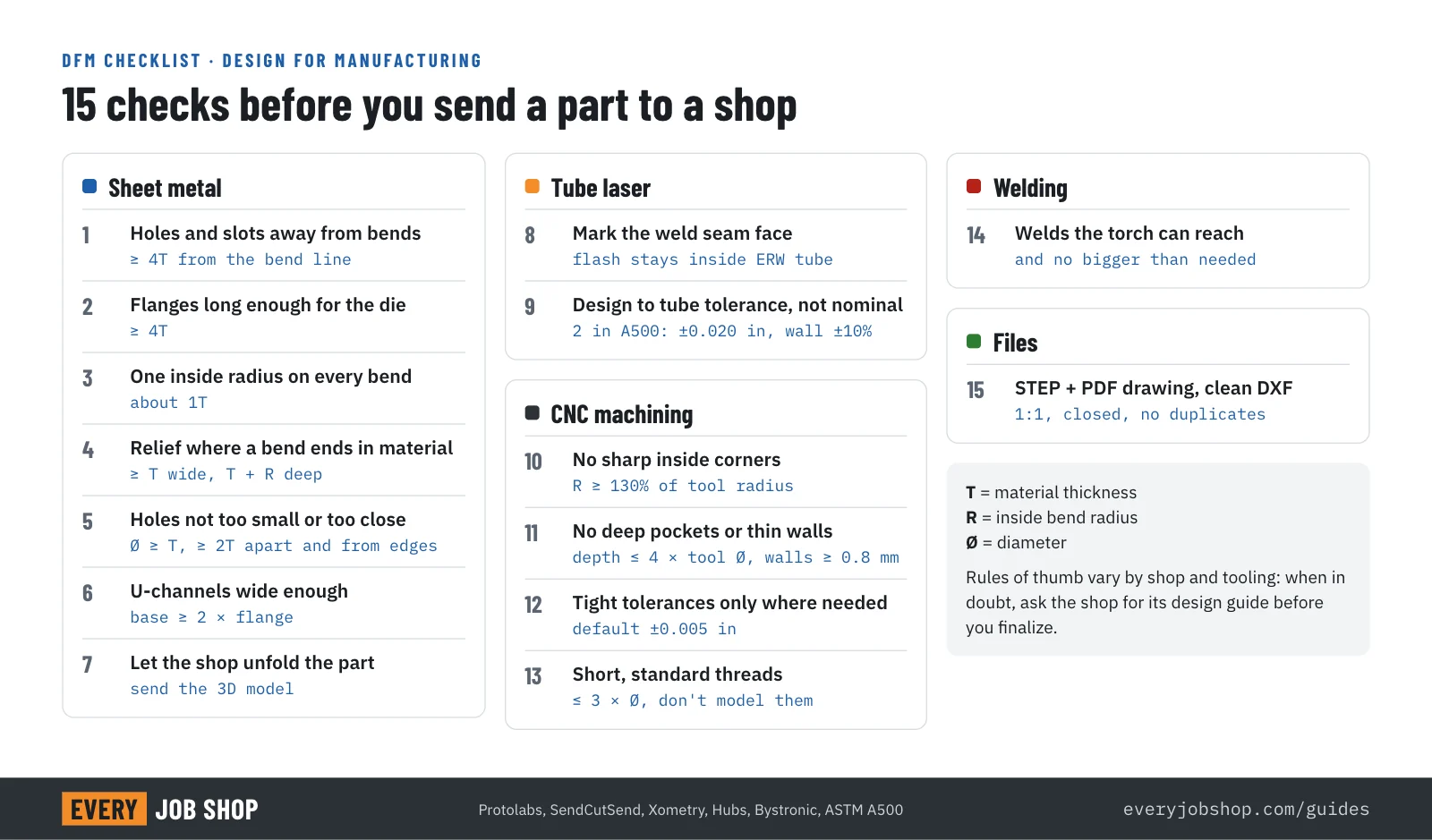
This guide goes through them by process: what goes wrong, the rule of thumb with its source, and the fix. The numbers come from published design guides by shops and toolmakers. They are not universal limits, and where sources disagree we say so.
Does design really decide 80% of the cost?
You may have read that design decides 70 to 80 percent of a product's cost. It is one of the most repeated numbers in engineering, and nobody has found the study behind it: AllAboutLean traced it and found no source. A 2001 review in the Journal of Engineering Design disputes it, and an MIT working paper from 1993 tested it on real products. AllAboutLean's reading of that result puts design's share closer to half.
Half is still a lot. More important for you: the mistakes below don't just raise the cost, they decide whether you get a quote this week or a list of questions next week.
How to read the rules: T is the material thickness, R the inside bend radius and Ø a diameter.
Sheet metal: laser cutting and press brake bending
Most sheet metal mistakes come from one fact: a press brake bends the sheet over a V-shaped die, and the die needs room.
1. Holes and slots too close to a bend
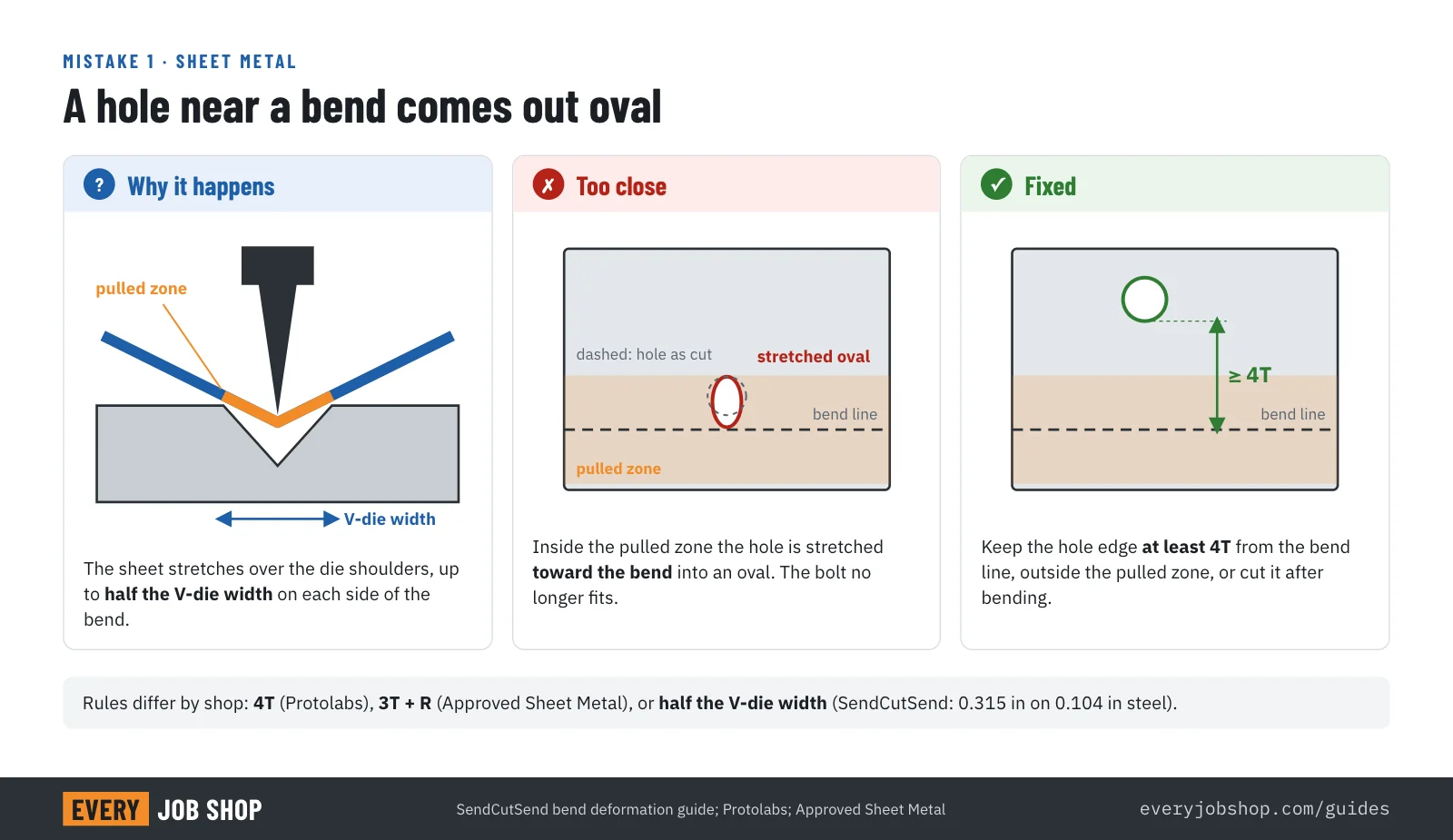
What goes wrong: while the punch pushes the sheet into the die, the die shoulders stretch the material on both sides of the bend. A hole in that zone comes out oval, and the edge next to it bulges. The bolt no longer fits.
Rule of thumb: keep the edge of a hole at least 4T from the bend line (Protolabs). Approved Sheet Metal uses 3T plus the bend radius. SendCutSend ties it to the tool: anything within half the V-die width of the bend distorts, which on 0.104 in steel is 0.315 in.
Fix: move the hole, cut a relief slot between the hole and the bend, or ask the shop to cut the hole after bending.
2. Flanges too short for the die
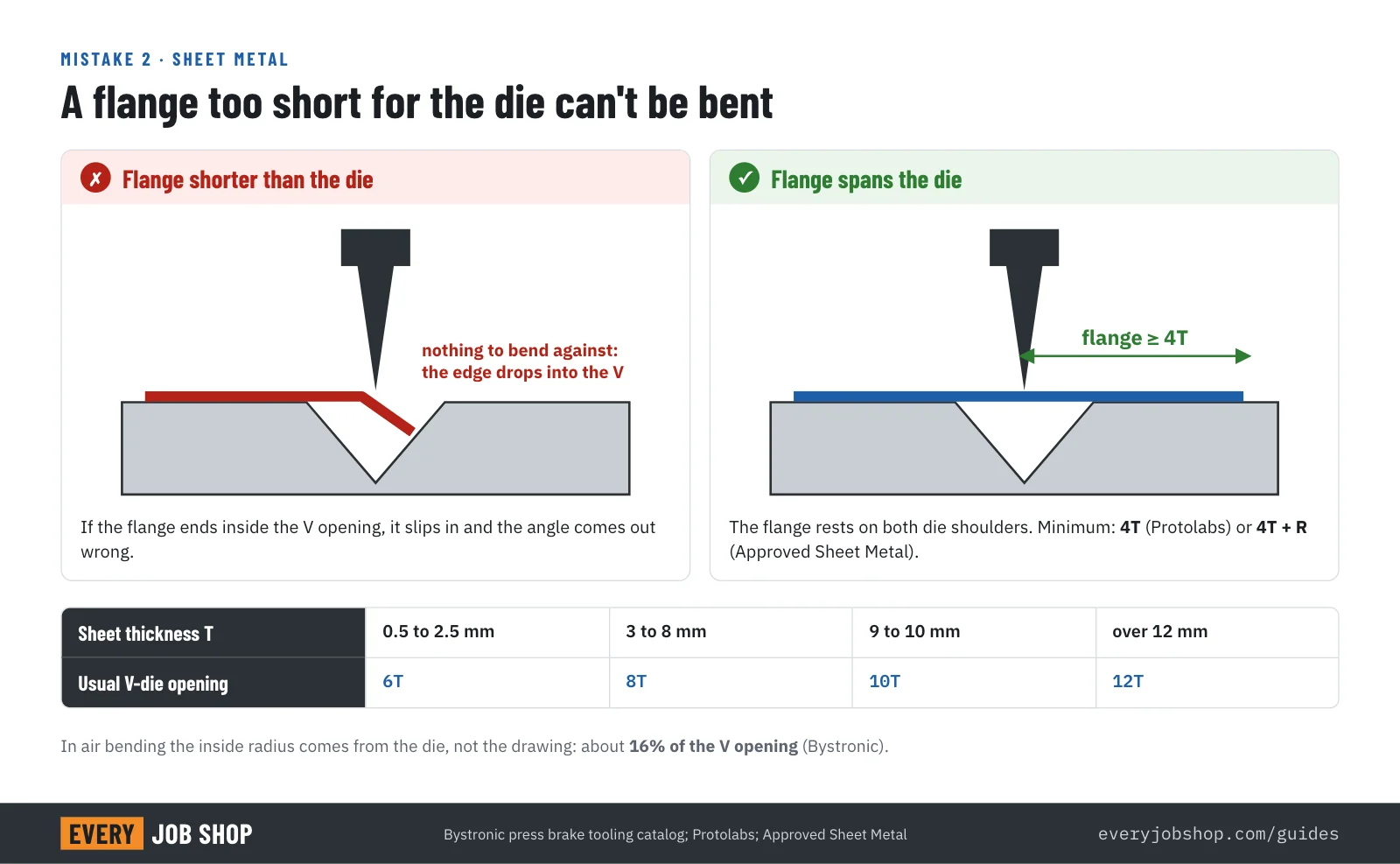
What goes wrong: to be bent, the flange has to rest on both shoulders of the die. A flange shorter than about half the V opening drops into the V, and the angle comes out wrong, if it bends at all.
Rule of thumb: a minimum flange of 4T (Protolabs) or 4T + R (Approved Sheet Metal). The die opening grows with thickness: Bystronic's tooling catalog recommends a V opening of about 6T for 0.5 to 2.5 mm sheet and 8T for 3 to 8 mm, so thick parts need longer flanges.
Fix: lengthen the flange. If the design can't take it, the shop can bend a longer flange and trim it afterwards, at the cost of another operation.
3. A different bend radius on every bend
What goes wrong: in air bending, the inside radius isn't set by the drawing but by the die: about 16% of the V opening, according to Bystronic. Every different radius on a part can mean a different die and another setup. A radius much tighter than the thickness can crack the outside of the bend, especially in hard alloys such as 6061-T6.
Rule of thumb: use one inside radius for every bend on the part, about equal to the thickness, which is also roughly the smallest radius in Bystronic's table for thin sheet. Protolabs offers standard radii from 0.030 in and notes that 0.030 in works on 95% of parts; 6061-T6 needs a larger one.
Fix: pick one radius from your shop's standard list and use it everywhere unless a bend truly needs another.
4. No bend relief
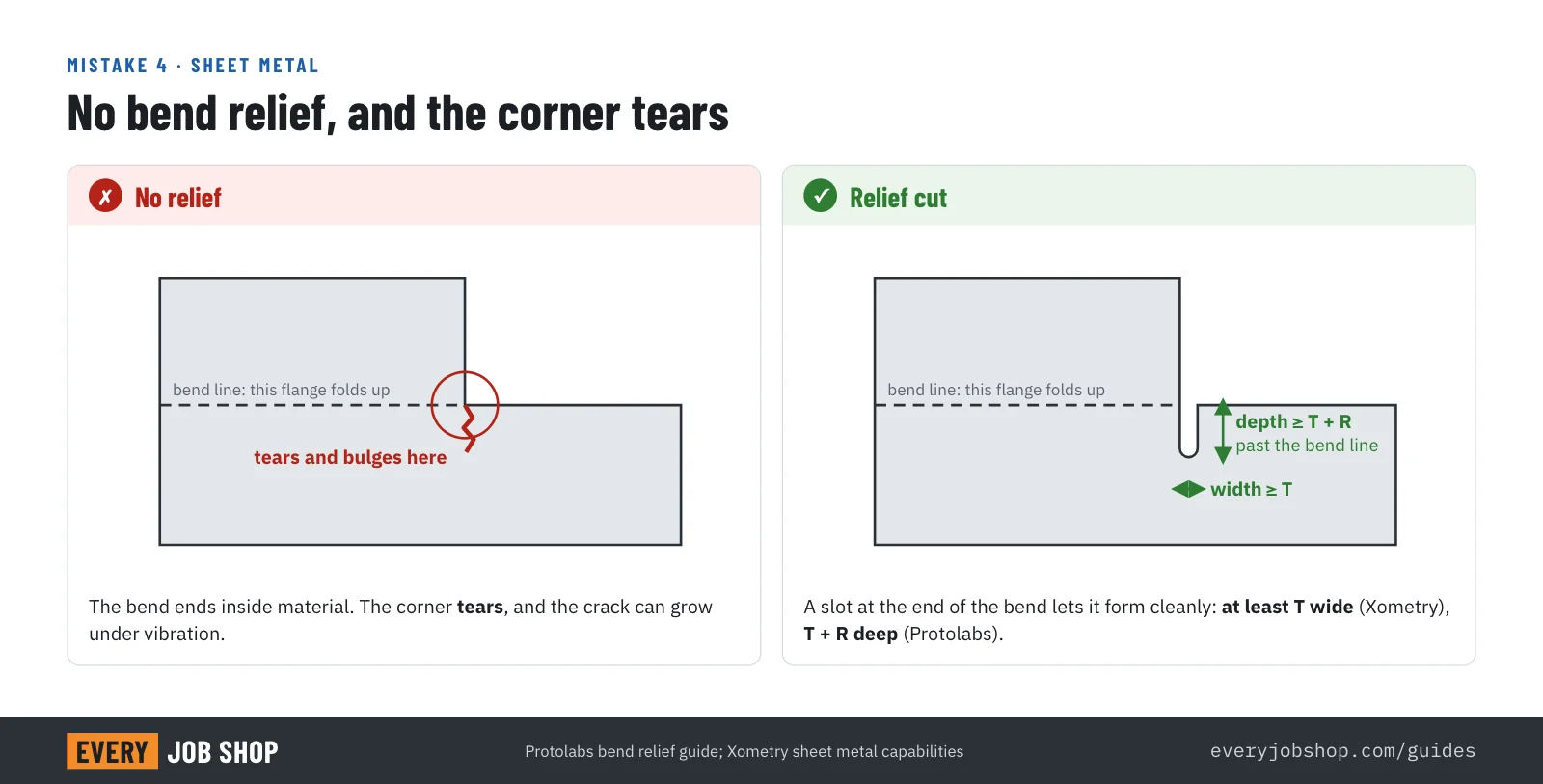
What goes wrong: where a bend ends next to material that doesn't bend, the sheet has nowhere to go. The corner tears or bulges, and a small tear can grow into a crack under vibration.
Rule of thumb: you need a relief only where there is material on both sides of the end of a bend (Protolabs). Make it at least T wide (Xometry) and reaching past the bend by about T + R (Protolabs).
Fix: add a small slot or notch at the end of each bend that runs into material. Most CAD sheet metal tools add one automatically if you let them.
5. Holes too small, or too close to edges and to each other
What goes wrong: a small punch breaks, and a small laser-cut hole in thick material comes out tapered or out of round. Holes close to an edge or to each other leave a thin web that deforms when punched or warps from the heat of the laser.
Rule of thumb: a hole diameter of at least the thickness. That is Protolabs' rule for laser-cut sheet, and punch toolmaker Mate's ratio for punching mild steel with standard tooling; for stainless, Mate recommends twice the thickness. Some laser shops go smaller: SendCutSend allows 50% of the thickness. Keep at least 2T between holes and from holes to the edge (Mate).
Fix: check small holes against the shop's limits, or drill and ream precise small holes after cutting.
6. U-channels too narrow for the tooling
What goes wrong: when the second flange of a U-channel is bent, the first one swings up toward the press brake. If the channel is narrow and tall, it hits the punch or the ram, and the part can't be formed.
Rule of thumb: make the base of a U-channel at least twice the flange height (SendCutSend, Protolabs). Each extra bend also adds tolerance: SendCutSend counts at least ±0.015 in per bend.
Fix: widen the channel, shorten the flanges, or make it from two parts that are welded or riveted.
7. Sending your own flat pattern as the truth
What goes wrong: the flat length of a bent part depends on the K-factor, which moves between about 0.3 and 0.5 with the material, thickness and die (Approved Sheet Metal). Your CAD default isn't the shop's press brake, so a flat pattern drawn with it can put every bend in the wrong place by a fraction.
Rule of thumb: send the 3D model and let the shop unfold it with its own bend data. Protolabs, for example, uses its own K-factors.
Fix: dimension the drawing from the bent part, the way you will inspect it, not from the flat.
Tube laser cutting
A tube laser cuts holes, slots and copes in round and rectangular tube in one setup. The tube, though, is never exactly what the CAD library shows.
8. Ignoring the weld seam
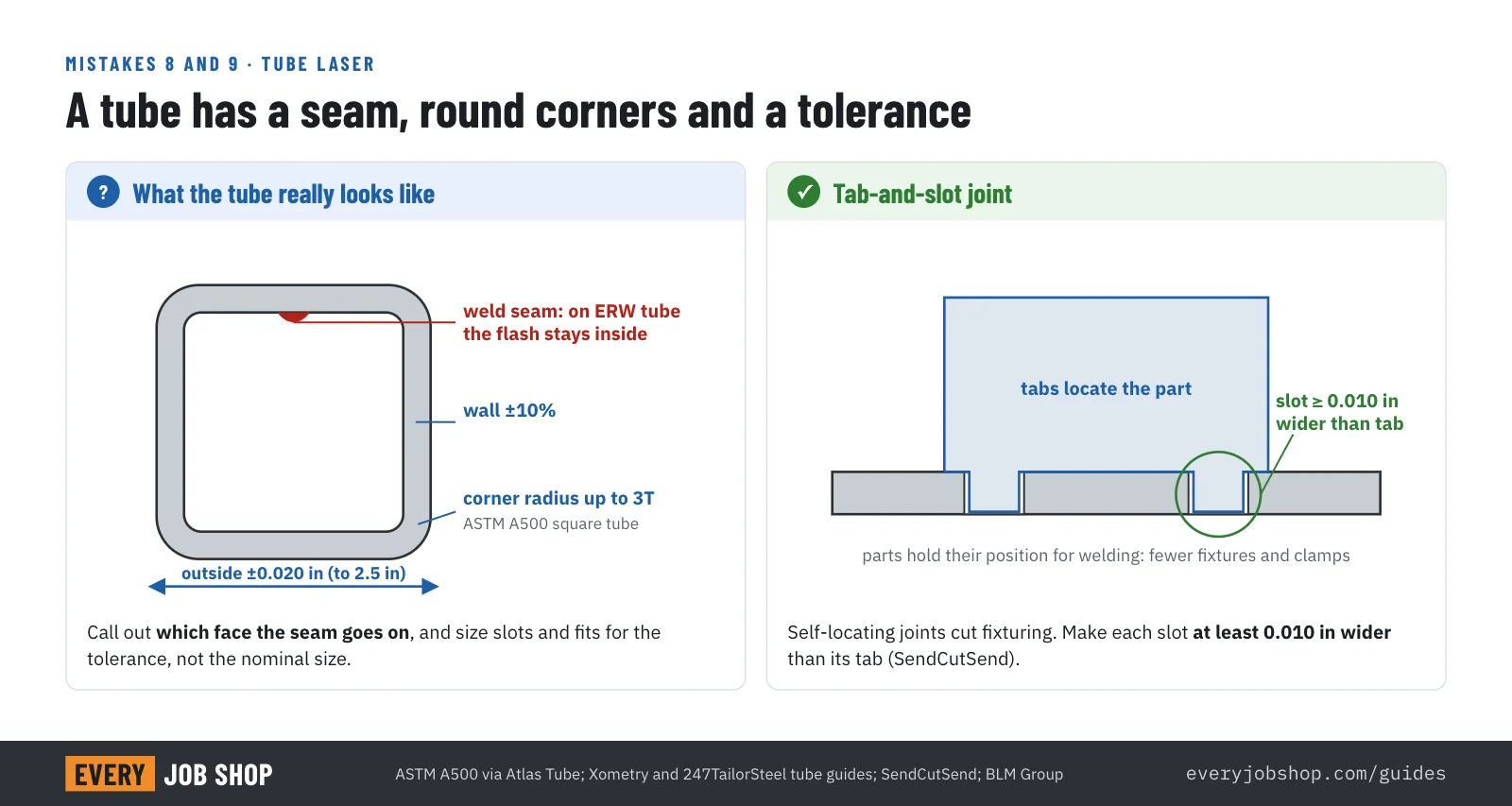
What goes wrong: most structural tube is ERW, rolled from strip and welded along one side. On ERW tube, the weld flash usually stays on the inside (Metal Supermarkets). A hole or slot cut through the seam, or a part meant to slide inside the tube, can run into it.
Rule of thumb: "design around seams on welded material and call out the location" (Xometry). Shops such as 247TailorSteel ask on which face the seam should go.
Fix: keep critical features off one face and say on the drawing where the seam may go. Where a smooth inside matters, specify DOM tube, which has the flash removed.
9. Designing to the nominal tube size
What goes wrong: a 2 in square tube isn't 2.000 in. Under ASTM A500 the outside size of square tube up to 2.5 in may vary by ±0.020 in, the wall by ±10%, and the corners can have a radius of up to three times the wall (Atlas Tube, summary of A500 tolerances). Slots sized to the nominal dimension don't fit, and parts that sit in a corner hit the radius.
Rule of thumb: don't ask for tube features tighter than about ±0.010 in, and dimension them from the tube's centerline (Xometry).
Fix: size slots and fits for the tolerance, and use tab-and-slot joints so the parts locate each other. Make each slot at least 0.010 in wider than its tab (SendCutSend). Tube laser maker BLM points out that such joints remove the need for clamping during welding.
CNC machining
On a CNC mill, the cutter is round and has a length. Most machining mistakes forget one or the other.
10. Sharp inside corners
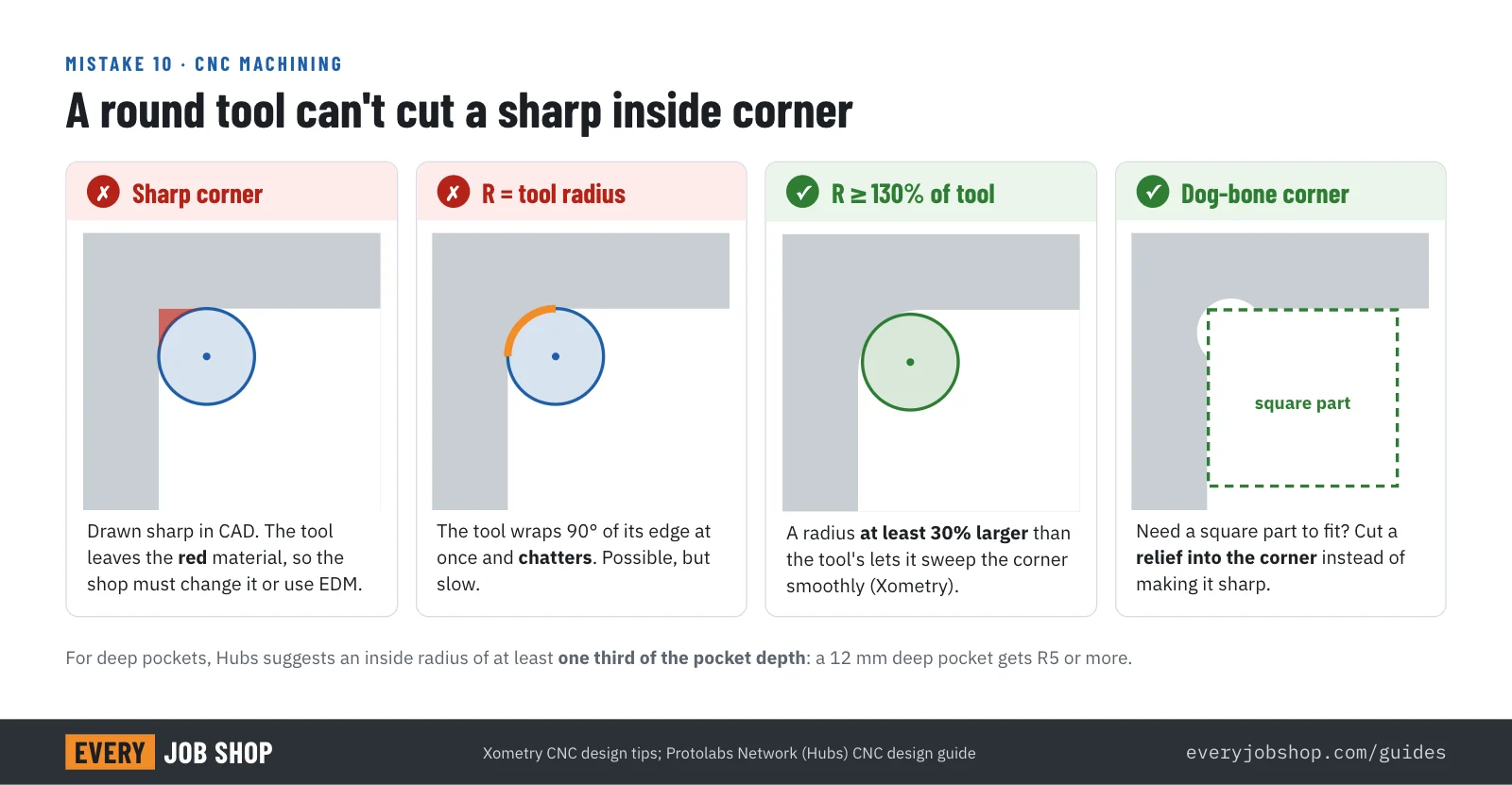
What goes wrong: a round end mill can't cut a sharp inside corner, so a pocket drawn with sharp corners can't be milled as drawn. A radius exactly equal to the tool radius can be cut, but the tool wraps a quarter of its edge around the corner at once and chatters.
Rule of thumb: make inside corners at least 130% of the tool radius (Xometry). For deep pockets, Hubs suggests a radius of at least a third of the depth: a 12 mm deep pocket gets R5 or more.
Fix: add the radius, and if a square part has to fit in the pocket, use dog-bone or T-bone reliefs in the corners. A truly sharp corner needs EDM, which costs far more.
11. Deep pockets and thin walls
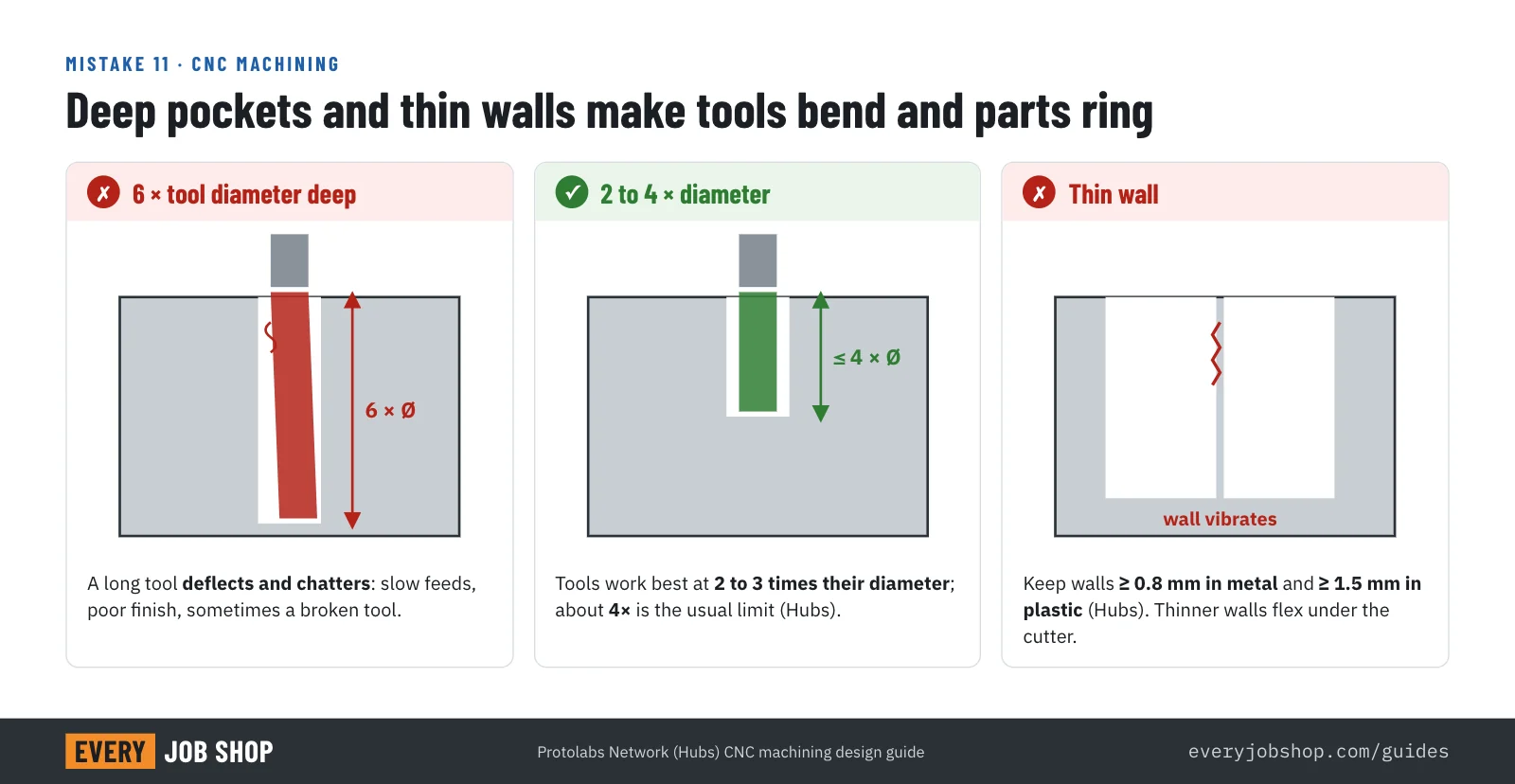
What goes wrong: a deep pocket needs a long tool, and a long tool bends and vibrates. The shop has to cut slowly, the finish suffers and tools break. Thin walls flex under the cutter in the same way.
Rule of thumb: cutting tools work best at 2 to 3 times their diameter in depth, and about 4 times is the usual limit for a pocket (Hubs). Keep walls at least 0.8 mm in metal and 1.5 mm in plastic (Hubs).
Fix: make pockets shallower or wider, add ribs instead of thin walls, or split a deep part into two.
12. Tight tolerances everywhere
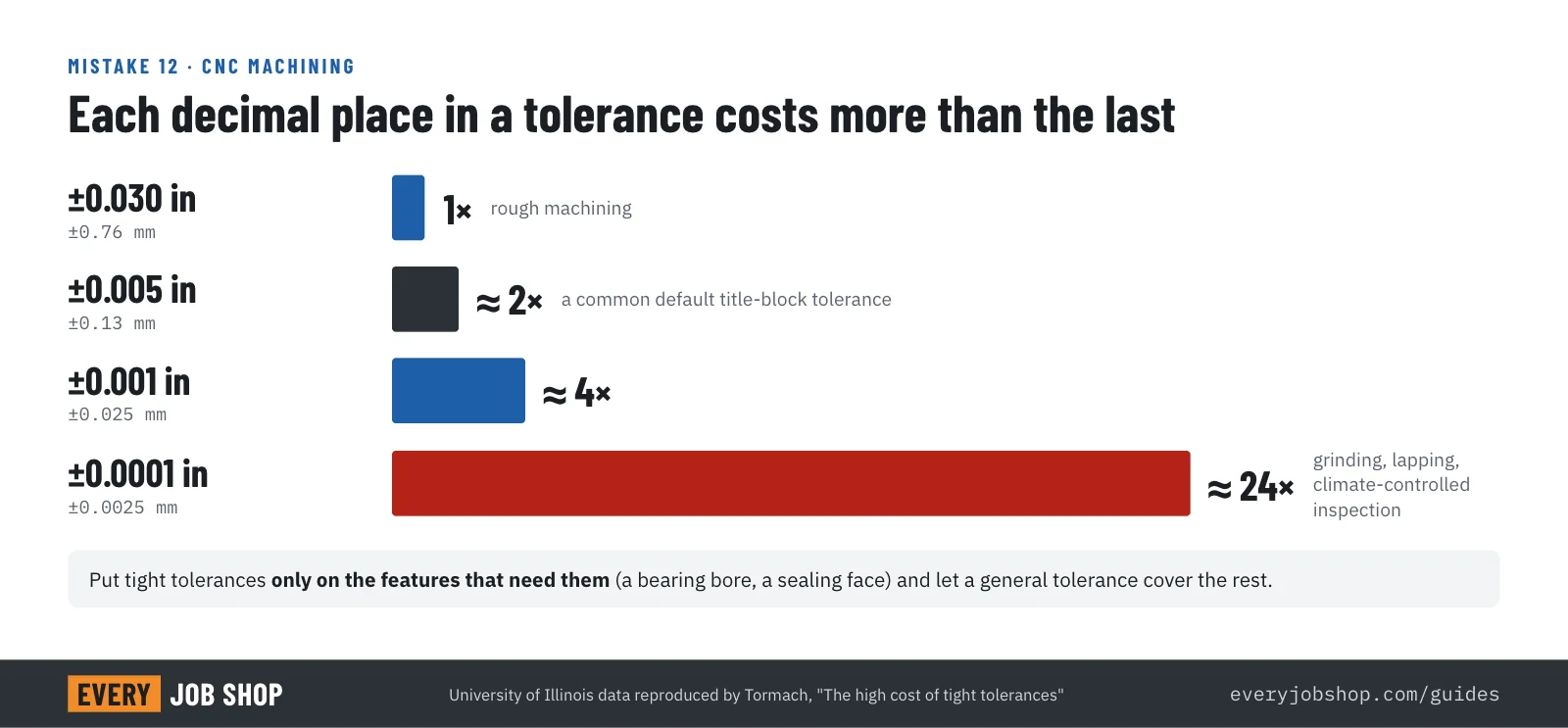
What goes wrong: a title block that says ±0.001 in on every dimension makes every feature an inspection job. The cost doesn't rise in a straight line: in data reproduced by Tormach, ±0.005 in costs about twice as much as rough machining, ±0.001 in about four times, and ±0.0001 in about 24 times. The data dates from 1951, and CNC has changed the numbers, but not the shape of the curve.
Rule of thumb: use a general tolerance of ±0.005 in (±0.13 mm), the standard at Protolabs, or ISO 2768 medium.
Fix: tighten only the features that carry the function: bearing bores, sealing faces, locating holes. Our guide to CNC machining cost shows where else the money goes.
13. Threads that are too deep, modeled, or non-standard
What goes wrong: a thread deeper than it needs to be takes longer to tap and risks broken taps in blind holes. Threads modeled as helical geometry confuse quoting software, and odd sizes need special tools.
Rule of thumb: engagement beyond about 1.5 times the diameter adds little strength, so don't thread deeper than 3 times the diameter, and leave half a diameter unthreaded at the bottom of a blind hole (Hubs). Protolabs asks you to avoid modeling internal threads.
Fix: model the tap drill hole, call out the thread (for example 1/4-20 UNC or M6x1) on the drawing, and stick to standard sizes.
Welding and assembly
14. Welds the torch can't reach, and welds bigger than needed
What goes wrong: a weld drawn in a corner the torch can't reach gets made badly or not at all. Oversized welds add heat, and heat adds distortion: TWI shows that making a fillet weld with an 8 mm leg instead of 6 mm adds 57% more weld metal, and angular distortion grows with the number of passes.
Rule of thumb: design welds that can be reached, ideally from the outside of the part (Protolabs), size them to the load, and specify them with standard weld symbols (AWS A2.4).
Fix: use intermittent welds where a continuous one isn't needed, balance welds on both sides of a joint, and use tab-and-slot features so the parts hold their position while they are welded.
Files and the RFQ package
15. An STL instead of a STEP, or a messy DXF
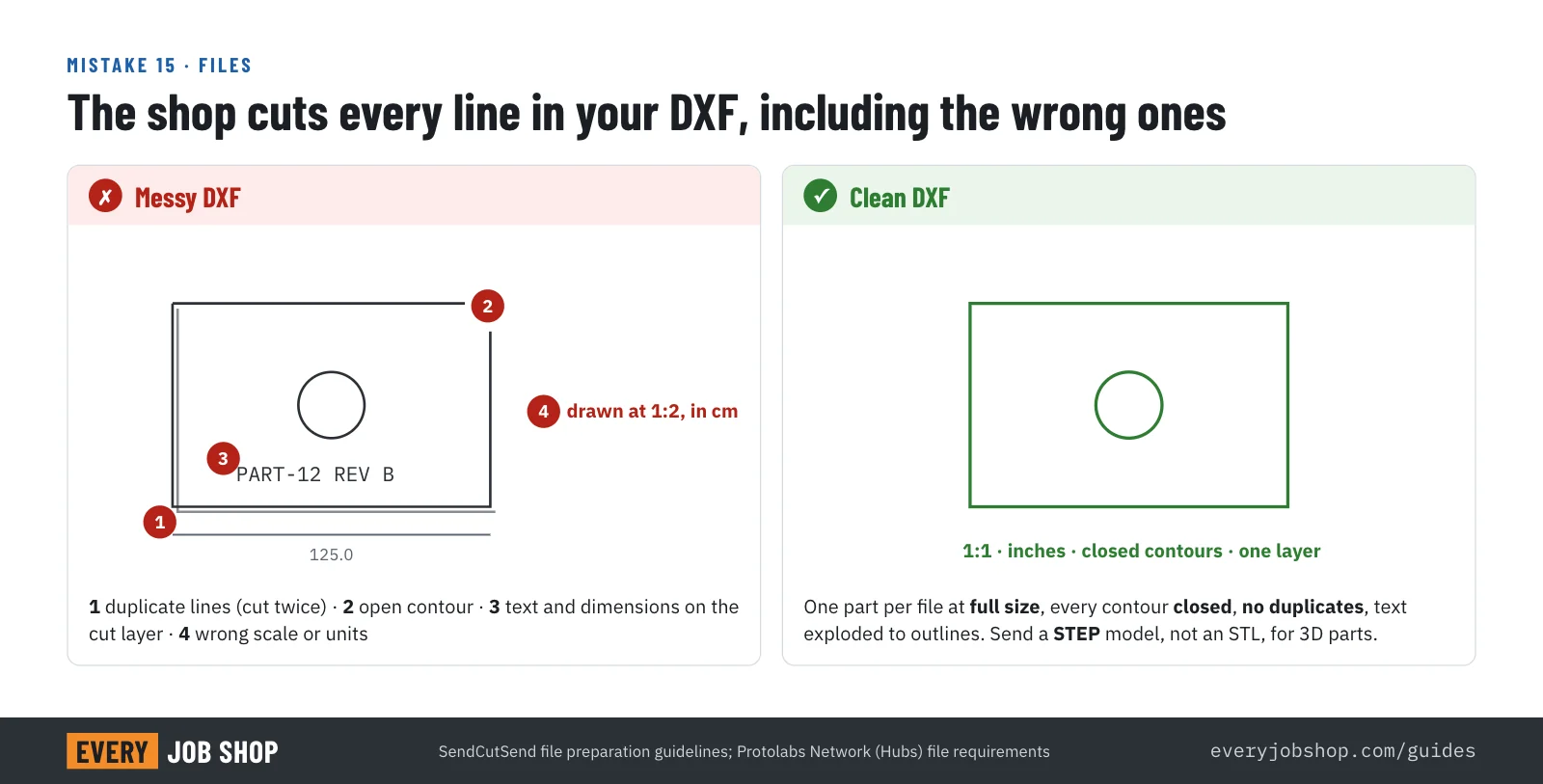
What goes wrong: an STL describes the part as triangles, carries no units and turns round holes into polygons. Hubs doesn't accept STL for CNC or sheet metal for that reason. For flat parts, the shop's CAM software cuts every line in your DXF: duplicate lines get cut twice, open contours don't close, and text on the cut layer gets cut as text.
Rule of thumb: send a STEP model for 3D parts, a PDF drawing for tolerances and threads, and a DXF at 1:1 with closed contours, no duplicate lines and text exploded to outlines (SendCutSend).
Fix: export clean files once and keep them with the part. Our guide on what to send for a machine shop quote lists everything else that belongs in the RFQ, from material grade to quantity breaks.
Bring the shop in before the design is frozen
Rules of thumb get a design most of the way. The last part comes from the shop that will make it: its dies, its cutters, its machines. Ask for its design guide before you finalize, and send the model for comments while changes are still cheap.
When the design is ready, search the index for shops that run the process you need, and send one request to several of them at once. Different shops have different tooling, so a part one shop calls hard may be routine for another.
Questions people ask
- What is DFM?
- Design for manufacturing (DFM) means shaping a part so it can be made with the shop's real tools at a reasonable cost: holes far enough from bends, inside corners a cutter can reach, tolerances only where the function needs them. DFA, design for assembly, does the same for putting parts together. A DFM review checks a design against those limits before it goes out for quotes.
- Are these rules the same at every shop?
- No. They are rules of thumb from published shop design guides, and the sources sometimes disagree, as noted in this guide. The real limits depend on each shop's press brake dies, cutters and machines. When a part is close to a limit, ask the shop for its own design guide or send the model for a quick review before you finalize.
- Will a shop fix my design for me?
- Many will. Some adjust small things without asking, which is risky if a dimension matters to you. Others point out problems in the quote, and some charge for a proper DFM review and redesign. Either way, a design that is ready for production gets quoted faster and cheaper, because the shop does not have to price in the risk.
- Should I send a STEP file or an STL?
- A STEP file. STL and other mesh formats describe the surface as triangles, carry no units and turn round holes into polygons, so most shops cannot quote machined or sheet metal parts from them. Send STEP for the 3D model, a PDF drawing for tolerances and threads, and a DXF at full size for flat laser-cut parts.
- What tolerance should I put on a machined part?
- Put a general tolerance in the title block, commonly ±0.005 in (±0.13 mm) or ISO 2768 medium, and call out tighter tolerances only on the features that need them, such as bearing bores, sealing faces and locating holes. Tighter tolerances everywhere raise the price without making the part work better.